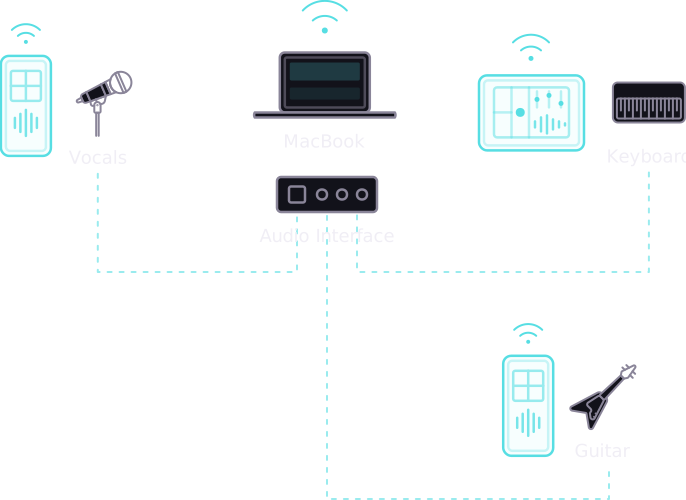
Multiplayer control
One looper device, many remote controls. Connect from any phone or tablet on your Wi-Fi.
Re-loop through FX
Instantly re-loop your audio through effects chains. Layer and transform on the fly with a built-in suite of dynamic effects that stay in perfect sync with your jam.
Retrospective looping
Loop what you just played. Samsara is always listening — capture the magic whenever you like.
First loop BPM
Set your tempo instantly from your first loop. No click tracks needed — just play and go.
Ableton Link
Stay in sync with Ableton Live and any Link-enabled app on your network. Seamlessly integrate with other musicians, sequencers, and drum machines.
Standalone & VST3
Run as a standalone macOS app or drop the VST3 plugin straight into your DAW. Whether you're playing live on stage or producing in the studio, Samsara adapts to your workflow.
📥 Downloads
Get Samsara
⚠️ Note for macOS users
Because Samsara is an experimental developer app, it is currently "unsigned." This means your Mac's built-in security will block the app from opening.
Use this quick Terminal trick to get things working:
- Open the Terminal app on your Mac (you can find it using Spotlight search).
- Type the following command, making sure to leave a single space at the end:
xattr -d com.apple.quarantine - Drag and drop the downloaded Samsara app or
.vst3file directly into the Terminal window. This will automatically fill in the correct file path for you. - Press Enter.
You can now open the app or plugin!
💬 We'd love your feedback
Found a bug? Have a feature idea? Let me know
 Made with by Bill Tribble, Actual Vibes Ltd